dnSpy - Debug and Edit .NET Assemblies with Ease

A powerful, free, and open-source debugger and .NET assembly editor. Debug .NET Framework, .NET Core, and Unity assemblies without needing source code.

What is dnSpy?

dnSpy is a professional-grade debugger and .NET assembly editor designed for developers, security researchers, and reverse engineers. Whether you need to debug complex .NET applications, analyze third-party assemblies, or edit compiled code, dnSpy provides all the tools you need in one comprehensive package.

In the world of .NET development, having the right debugging and analysis tools can make all the difference. dnSpy stands out as one of the most powerful and versatile tools available for working with .NET assemblies. Unlike traditional debuggers that require source code, dnSpy allows you to debug and edit any .NET assembly directly, making it an essential tool for developers who need to understand how applications work under the hood.

The tool has gained widespread popularity among developers for its ability to decompile, debug, and edit .NET assemblies seamlessly. Whether you're working with .NET Framework applications, modern .NET Core projects, or Unity game assemblies, dnSpy provides comprehensive support across all major .NET platforms. This cross-platform compatibility ensures that you can work with virtually any .NET application you encounter.

One of the most impressive aspects of dnSpy is its rich feature set. The integrated debugger supports advanced features like breakpoints, stepping through code, inspecting variables, and evaluating expressions at runtime. You can debug multiple processes simultaneously, set conditional breakpoints, and even debug dynamic assemblies. The debugging experience is comparable to Visual Studio, but with the added advantage of working without source code.

Beyond debugging, dnSpy excels as an assembly editor. You can modify method implementations, add new classes and methods, and even edit low-level IL code directly. The built-in C# and Visual Basic editors come with full IntelliSense support, making code editing feel natural and productive. Whether you need to fix a bug in a third-party library, patch legacy code, or customize behavior, dnSpy gives you the power to make changes at any level.

The hex editor integration is another standout feature. It allows you to view and edit raw binary data in assemblies, with special support for .NET metadata structures and PE file formats. You can jump between high-level decompiled code and low-level IL or hex views seamlessly, making it easy to understand exactly how your changes affect the underlying assembly.

Powerful Features for .NET Development

dnSpy combines debugging, decompilation, and editing capabilities into one comprehensive tool.

🐛

Advanced Debugger

Debug .NET Framework, .NET Core, and Unity assemblies without source code. Set breakpoints, step through code, inspect variables, and evaluate expressions in real-time. Support for conditional breakpoints, tracepoints, and multiple process debugging.

✏️

Assembly Editor

Edit methods and classes in C# or Visual Basic with full IntelliSense support. Modify existing code, add new methods and classes, or edit IL directly. All metadata can be edited to customize assembly behavior.

🔍

Powerful Search

Search assemblies for classes, methods, strings, and other elements. Analyze class and method usage, find callers, and explore dependencies. Navigate code quickly with intelligent search and reference highlighting.

🎮

Unity Game Support

Debug and edit Unity game assemblies with specialized support for Unity projects. Analyze game logic, modify behavior, and understand how Unity games work at the code level.

📝

Hex Editor

View and edit raw binary data with integrated hex editor. Navigate between decompiled code and IL/hex views seamlessly. Support for .NET metadata structures and PE file formats with helpful tooltips.

🎨

Multiple Themes

Choose from light, dark, and high contrast themes for comfortable coding in any environment. Customizable interface adapts to your preferences for optimal productivity.

🔧

Extensible Architecture

Use the public API to write extensions or script dnSpy using the C# Interactive window. Automate tasks, add custom features, and integrate with your development workflow.

📦

Export Projects

Export decompiled code to Visual Studio projects. Recover source code from compiled assemblies and continue development in your favorite IDE with full project structure.

⚡

High Performance

Fast loading and responsive interface even with large assemblies. Efficient memory usage and optimized performance ensure smooth operation during intensive debugging sessions.

See dnSpy in Action

Experience the power of dnSpy through these demonstrations of its core capabilities.

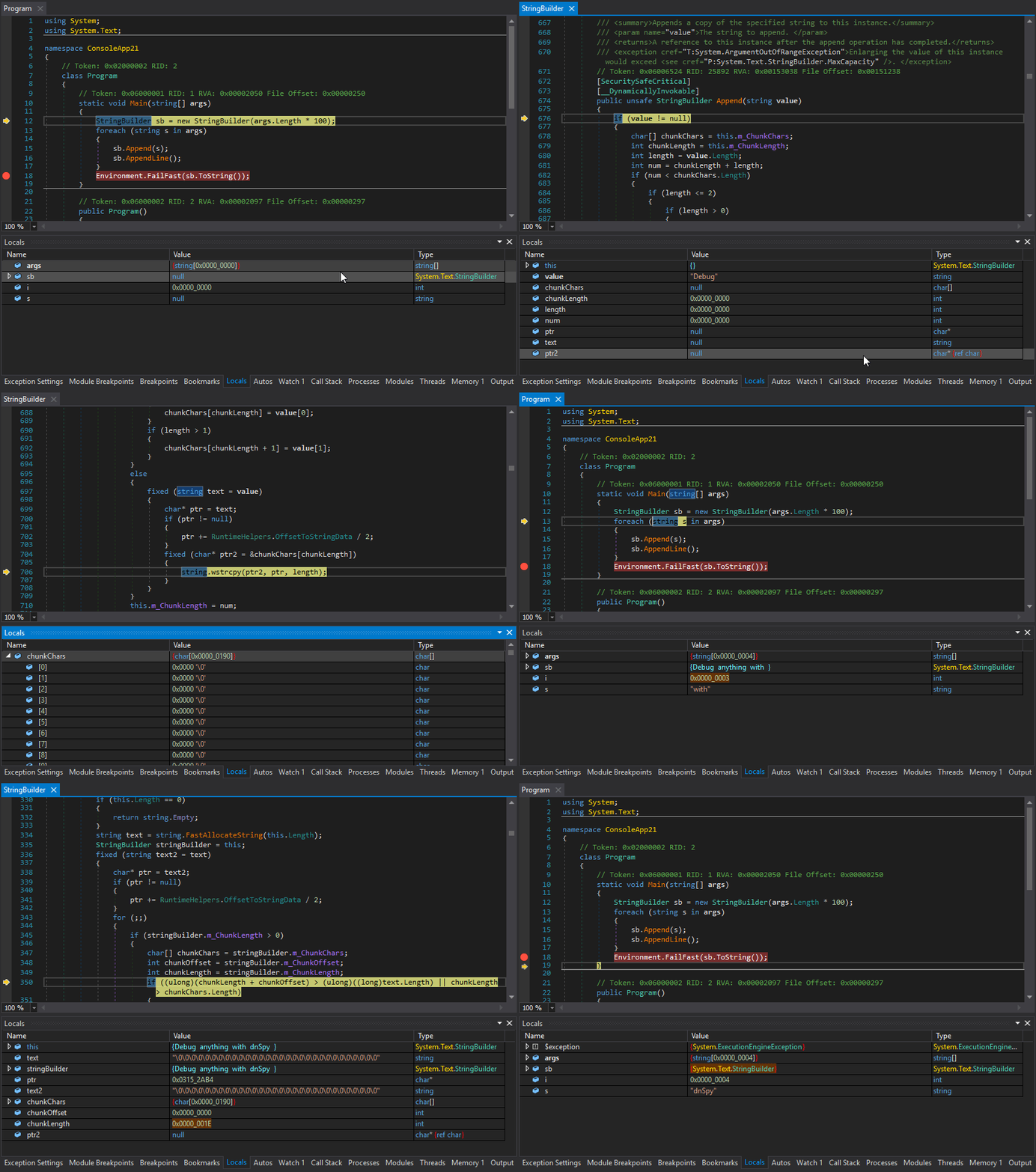
dnSpy debugging in action showing breakpoints and variable inspection

Real-time Debugging

Set breakpoints, step through code, and inspect variables in real-time. Debug complex applications without needing access to source code. Watch your code execute line by line.

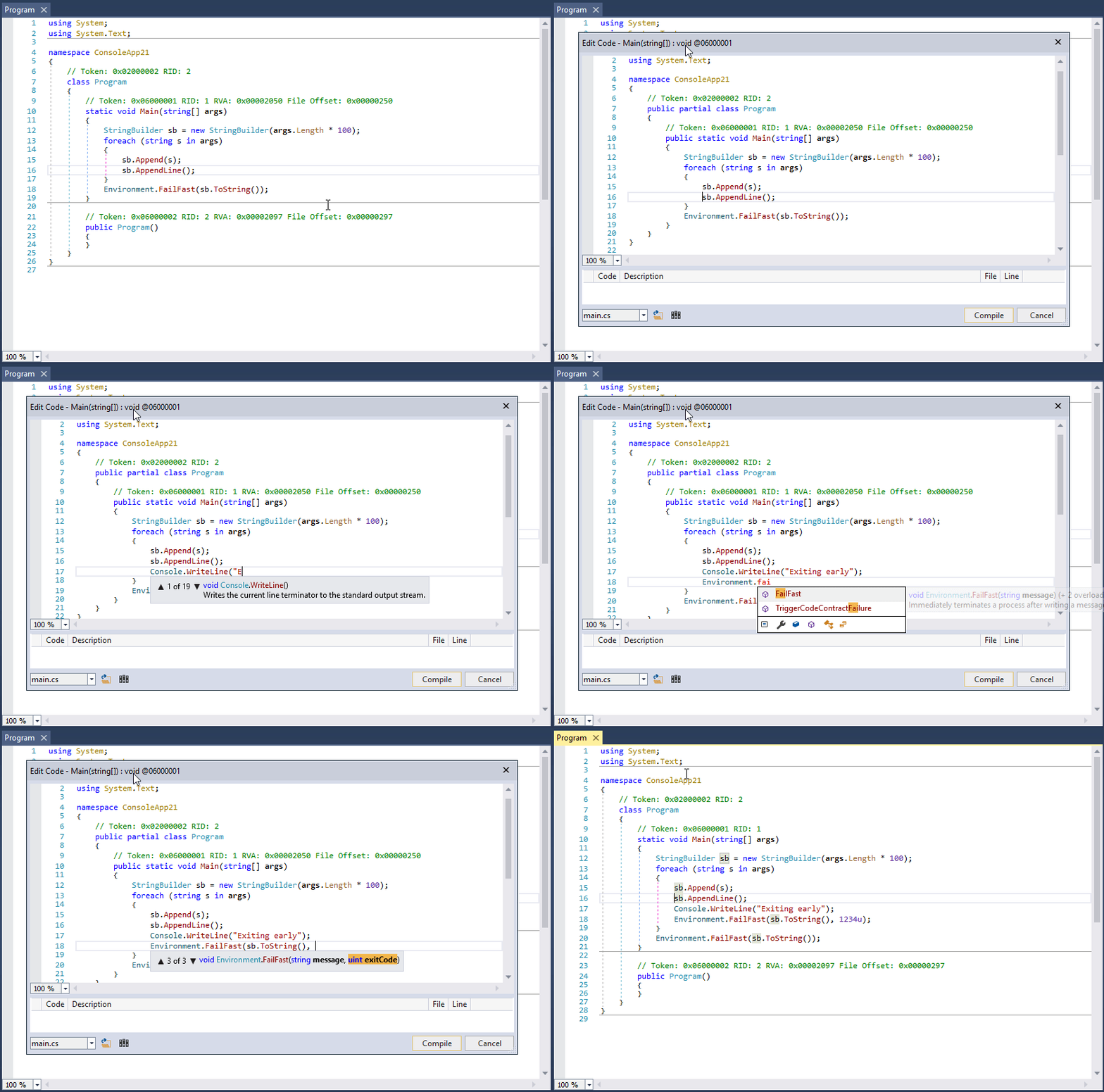
dnSpy code editing with IntelliSense support

Intelligent Code Editing

Edit methods and classes with full IntelliSense support. Modify compiled assemblies as easily as editing source code. Add new functionality or fix bugs on the fly.

Why Choose dnSpy?

dnSpy has become the go-to tool for .NET developers, security researchers, and reverse engineers worldwide.

🆓 Completely Free

dnSpy is open-source software licensed under GPLv3. Download and use it freely for any purpose, whether personal, educational, or commercial projects.

💪 Professional Grade

Despite being free, dnSpy offers professional-grade features that rival commercial tools. Used by developers at major companies and independent developers alike.

🔒 No Source Code Required

Work with any .NET assembly even without access to source code. Perfect for analyzing third-party libraries, legacy applications, or obfuscated code.

🌐 Active Community

Benefit from an active community of users and contributors. Regular updates, bug fixes, and new features keep dnSpy at the cutting edge.

Who Uses dnSpy?

dnSpy is trusted by software developers debugging complex applications, security researchers analyzing malware and vulnerabilities, game modders customizing Unity games, and students learning about .NET internals. Whether you're fixing bugs, performing security audits, or exploring how software works, dnSpy is the perfect companion for your .NET development journey.

Get Started with dnSpy

Common Use Cases

Application Debugging

Debug production issues in applications where source code is unavailable. Set breakpoints in third-party libraries, inspect internal state, and understand how code executes in real-world scenarios.

Security Analysis

Analyze potentially malicious .NET applications, understand their behavior, and identify security vulnerabilities. Essential tool for security researchers and penetration testers.

Legacy Code Maintenance

Work with legacy applications where source code has been lost. Decompile, understand, and modify old codebases to fix bugs or add new features.

Learning and Education

Study how professional .NET applications are built. Learn design patterns, best practices, and implementation details by examining real-world code.

Game Modding

Create mods for Unity games by analyzing and modifying game assemblies. Understand game mechanics and customize gameplay to your liking.

Library Analysis

Understand how third-party libraries work internally. Make informed decisions about library usage and troubleshoot integration issues effectively.

Key Debugging Capabilities

The dnSpy debugger offers comprehensive debugging features that make it stand out from other tools. You can debug .NET Framework applications from version 2.0 to the latest, as well as .NET Core and .NET 5+ applications. Unity game debugging is fully supported, allowing you to debug both Unity games and applications.

Setting breakpoints is straightforward and flexible. You can set regular breakpoints, conditional breakpoints that only trigger when specific conditions are met, and tracepoints that log information without stopping execution. The debugger supports breaking on module load, which is useful for debugging startup code, and breaking on thrown exceptions, including first-chance exceptions.

The variable inspection capabilities are extensive. The Locals window shows all local variables in the current scope. The Watch window lets you monitor specific expressions. The Autos window displays variables used near the current line. You can even save variable contents to disk, which is particularly useful for extracting decrypted data or configuration information.

Advanced features include Object IDs for tracking specific object instances across different parts of your code, support for debugging multiple processes simultaneously, and the ability to debug dynamic modules. The Call Stack, Threads, Modules, and Processes windows provide comprehensive visibility into your application's execution state.

The Output window logs all debugging events with timestamps, making it easy to track what's happening during your debugging session. You can also force dnSpy to always use in-memory images instead of disk files, which is invaluable when debugging applications that decrypt or modify themselves at runtime.

Assembly Editing Features

dnSpy's assembly editing capabilities are just as impressive as its debugging features. You can edit any metadata in .NET assemblies, giving you complete control over how assemblies are structured and behave. The C# and Visual Basic editors provide a familiar editing experience with full IntelliSense support.

You can edit existing methods by decompiling them to C# or Visual Basic, making your changes, and recompiling them back into the assembly. Adding new methods, classes, properties, and other members is straightforward. For advanced users, the IL editor provides low-level control over method implementation, allowing you to hand-craft IL code when necessary.

The hex editor can be used to edit low-level metadata tables directly. This is useful for making changes that aren't possible through the high-level editors or for understanding how .NET metadata is structured at the binary level. The hex editor includes helpful features like syntax highlighting for metadata structures and tooltips that explain what each field means.

All editing operations preserve the integrity of the assembly. dnSpy handles the complex task of updating metadata tokens, fixing references, and ensuring that the modified assembly remains valid and executable.
Ready to Get Started?

Download dnSpy today and experience the most powerful .NET debugger and assembly editor available. Join thousands of developers who rely on dnSpy for their daily development, debugging, and analysis tasks.

System Requirements

Minimum Requirements

  • ✓ Operating System: Windows 7 SP1 or later (64-bit or 32-bit)
  • ✓ .NET Framework: .NET Framework 4.7.2 or later
  • ✓ Memory: 2 GB RAM minimum, 4 GB recommended
  • ✓ Storage: 500 MB free disk space
  • ✓ Display: 1024x768 minimum resolution